 Rank Forge Marketing
Electrician Marketing Ideas That Book Jobs (2026)
The short answer
The electrician marketing ideas that book the most jobs are the ones closest to the phone call: a complete Google Business Profile, a page for each money service, steady reviews and a mobile site that makes calling or requesting an estimate easy. Fix those before paying for awareness, then add ads and an instant estimate to catch planned projects like panel upgrades and EV chargers.
The quick list
- 1. Grade your Google map listing before you spend anything
- 2. Build a page for each money service
- 3. Put your license and reviews on the first screen
- 4. Ask for a review after every finished job
- 5. Turn each finished job into a Google post
- 6. Add city pages only where you have real work
- 7. Add an instant estimate for planned projects
- 8. Run emergency and planned-project ads separately
- 9. Track every call and form back to its source
- 10. Make it easy for AI assistants to recommend you
1. Grade your Google map listing before you spend anything
Start by grading your Google Business Profile, because the map results are one of the first places homeowners look for an electrician and most of the fixes cost time, not money.
Check that your primary category matches the work you most want, that every service you offer is listed, that your service area and hours are accurate, and that the website link points to a page that matches the search. Then compare your review count and rating with the three listings above you.
The free Electrician Map Pack Grader does this in a couple of minutes. It scores your listing out of 100, shows how far behind the top listing you are on reviews and ranks your fixes by impact.
2. Build a page for each money service
Give every high-value service its own page, because a homeowner who searches for a panel upgrade wants a page about panel upgrades, not a list of everything you do.
Panel upgrades, EV charger installs, standby generator hookups, whole-home rewiring and emergency service each come with different questions. Each page should explain what the job involves, how permits and inspections work in your area, what affects the price and which cities you serve, with photos from real installs and one clear call or estimate button.
A single services page with one line per service gives Google nothing specific to rank and gives the homeowner no reason to pick you. See how we structure these pages on our marketing for electricians page.
3. Put your license and reviews on the first screen
Show your license, insurance and star rating at the top of every page, because homeowners want proof of qualification before they let anyone near their panel.
Put your license number in the header or just under the headline, not on an about page nobody opens. Add a real photo of the owner or crew, your truck and a short line about who does the work. These details answer the trust question in seconds, which matters most on emergency calls where the homeowner is choosing fast.
4. Ask for a review after every finished job
Ask every satisfied customer for a Google review the same day the job wraps up, using a short text with a direct link.
Reviews affect both where you show in the map results and whether a homeowner calls once they see you. A simple routine beats an occasional push: finish the job, confirm the customer is happy and send the link before you leave the driveway. Invite them to mention the job and their neighborhood in their own words, reply to every review, and never offer discounts or gifts in exchange, which Google's review policies prohibit.
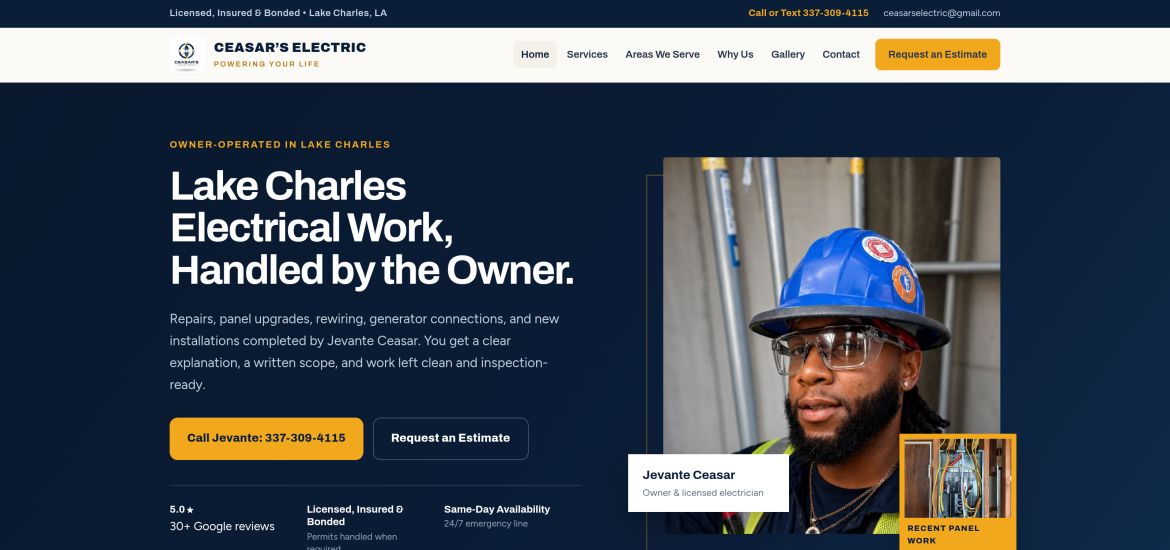
Ceasar's Electric, an electrical contractor we built a website and local foundation for, has 33 five-star reviews on its Google Business Profile. Those reviews belong to Ceasar's customers, and they give new homeowners strong proof before they call.
5. Turn each finished job into a Google post
Post a short update with real photos after each notable job, because fresh, specific activity shows Google and homeowners that you actually do the work.
A good job post names the service, the city and the problem you solved, such as an outdated panel replaced ahead of an EV charger install. Use your own photos, describe the work in plain language and leave out the customer's address. The same write-up can become a project page on your website.
The free Job Post Builder turns a finished job into a Google Business Profile update, a project page, photo file names and a review request text, ready to paste.
6. Add city pages only where you have real work
Build pages for the three to six areas you most want work from, and fill each one with real local jobs instead of swapping city names into the same text.
Copy-and-paste city pages rarely help and can make the whole site look thin. A useful city page shows jobs you completed there, the neighborhoods you cover, local permit or utility details you know well and reviews from customers in that area. Start with the cities closest to your shop and add more as the jobs come in.
7. Add an instant estimate for planned projects
For planned jobs like panel upgrades and EV chargers, an instant price range on your website captures homeowners who are still comparing quotes and aren't ready to call.
Homeowners researching a planned project often want a ballpark before they talk to anyone. A short estimate tool that asks a few questions and shows a range built on your own pricing gives them that answer, and sends you the lead with the project details already filled in.
Try the instant estimate demo to see how it works. The prices in the demo are samples; we build the real version around your rates and the jobs you want more of.
8. Run emergency and planned-project ads separately
Split urgent searches from planned projects in your ads, because someone whose power just went out and someone pricing an EV charger need different messages, schedules and landing pages.
Emergency campaigns should lead with tap-to-call, run only when you can actually answer and send people to an emergency page. Planned-project campaigns can send people to the matching service page or the instant estimate. Local Services Ads and Google search ads can both work for electricians; whichever you use, make sure every click lands on a page that matches the search. See how we handle paid ads.
9. Track every call and form back to its source
Track calls and form submissions by source so you know which pages and channels produce booked jobs, not just clicks.
At minimum, record which page every form came from, ask every new customer how they found you and use call tracking so you can tell Google profile calls from website calls. Review it monthly and move budget toward whatever books jobs.
To see what an extra lead is worth before you spend, use the free lead value calculator. Enter your average ticket, close rate and margin, and it shows how many extra leads it takes to pay for marketing.
10. Make it easy for AI assistants to recommend you
Some homeowners now ask AI assistants for an electrician instead of scrolling the map, so make your services, service area, license and reviews easy to find and consistent everywhere.
AI assistants and Google's AI Overviews summarize what they can find and confirm about a business. Clear service pages that answer common questions directly, the same business name, address and phone number across directories, and a steady flow of reviews all make your business easier to describe and recommend. Our AI search optimization page explains how we approach it.
What a starting budget buys
You don't need a large retainer to fix the basics. Rank Forge publishes starting prices so you can decide whether a conversation makes sense before scheduling one.
- $599 one-time local visibility setup: Google Business Profile, categories, service area and citations, for businesses that already have a usable website.
- $999 one-time lead-generation website: up to five pages with lead forms and click-to-call, for businesses whose site is missing or holding them back.
- $699/month ongoing local growth: profile optimization, one new SEO page a month, citations and a monthly report once the foundation is in place.
See exactly what each includes on the pricing page. There's no year-long contract, and no honest provider can guarantee a specific ranking.
Proof from a real electrical contractor
Ceasar's Electric relied on referrals and word of mouth and had no website. We built a website and local foundation in under 30 days. Results through October 2026:
- 4 website leads became paying clients since July 2026.
- 33 five-star reviews on the company's Google Business Profile.
- 7,553 Google Search impressions in a three-month Search Console export.
- Under 30 days from kickoff to a live website and local foundation.
Read the full Ceasar's Electric case study. Results depend on your market, competition and starting point, so treat these numbers as one real example, not a promise.
Find out what's holding your listing back
The free Electrician Map Pack Grader scores your Google listing, compares your reviews with the top result and ranks your fixes by impact. No sign-up needed.
Grade My Map ListingPrefer a person to look at it? Request a free marketing audit.
Frequently Asked Questions
What is the best marketing for electricians?
For most local electricians, the best marketing is a complete Google Business Profile, a page for each high-value service, steady reviews and a mobile site that makes calling easy. Paid ads work best once those basics are in place.
How much should an electrician spend on marketing?
Start with what a booked job is worth to you, then work backward. Rank Forge's starting prices are $599 for a one-time local visibility setup, $999 for a lead-generation website and $699 a month for ongoing local growth. The free lead value calculator shows how many extra jobs it takes to cover the cost.
How long does electrician SEO take to work?
Profile and website fixes can improve calls fairly quickly, while map pack and organic rankings usually build over several months. Results depend on your market, competition and starting point.
Does an electrician need a website if they have a Google profile?
Yes. The Google profile gets you seen, but a website with a page for each service gives Google more to rank and gives homeowners a reason to choose you. Ceasar's Electric had no website before Rank Forge built one, and four website leads have since become paying clients.
 Rank Forge Marketing